
A UK IPTV reseller messaged me last winter at 2 in the morning, panicking. His entire customer base had gone dark during a Champions League knockout. Streams dead. Refund threats piling up. He was convinced his server had been seized.
The server was fine. His M3U playlist had one missing pipe character on a single line, and a sloppy auto-generated export had cascaded that error across thousands of customer apps. One typo. One bad night.
That is the thing nobody tells you about this format. It looks trivial until it isn’t.
The short version, before anything else
An M3U playlist is a plain text file that tells a video player two things on repeat: what a channel is called, and where to fetch it. That’s the whole job. The IPTV M3U playlist format explained in one breath is just a list of label and address pairs, wrapped in a tiny bit of structure so apps know how to read it.
If your playlist is misbehaving, the cause is almost always one of three things: a broken or expired link inside the file, a formatting character in the wrong place, or an app that can’t parse the extended tags your provider stuffed in. Fix those in that order and you solve the overwhelming majority of cases.
Everything below explains why, and what experienced operators actually watch for.
What the file looks like when you open it
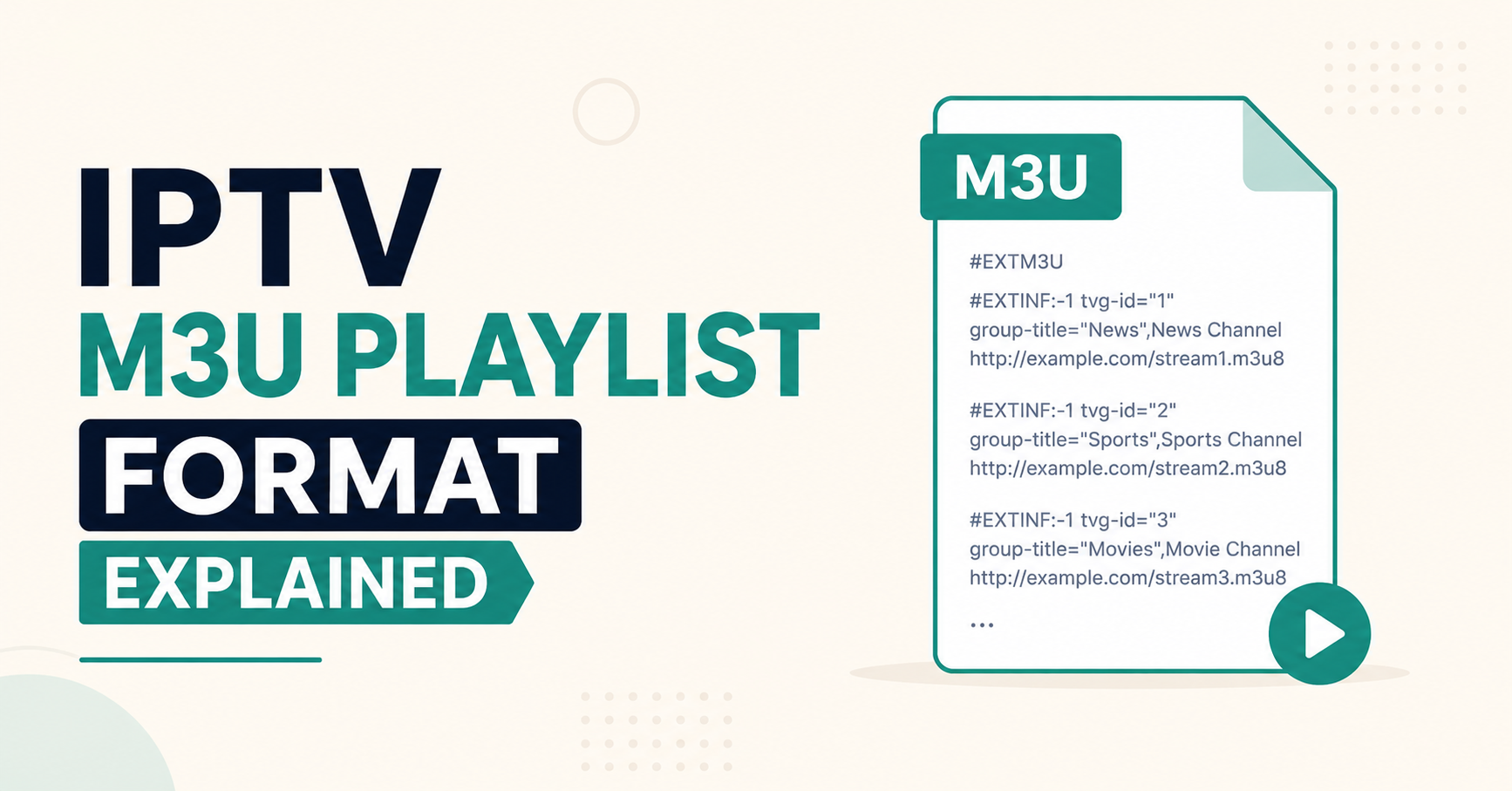
Open any M3U in Notepad and you’ll see it starts with one declaration:
#EXTM3UThat single line announces “this is a playlist.” Skip it, and a lot of players treat the whole file as garbage. Below it, channels come in pairs of lines. The first line describes the channel. The second line is the actual stream address the player connects to.
So a single channel block reads like this:
#EXTINF:-1 tvg-id="bbcone.uk" tvg-name="BBC One" tvg-logo="http://logo.url/bbc.png" group-title="UK",BBC One
http://yourserver.com:8080/live/user/pass/12345.ts
Two lines. That’s one channel. Repeat that pattern a thousand times and you have a full playlist. Once you see the rhythm, the format stops feeling mysterious.
Pro Tip:
The number right after #EXTINF: is duration in seconds. For live IPTV it’s always the value meaning “unknown length,” because a live channel never ends. If you ever see real durations there on a live playlist, someone exported it wrong, and certain players will choke on it.
Breaking down the description line piece by piece
Most people glaze over the EXTINF line because it looks like noise. It isn’t. Each chunk does a specific job, and knowing them is the difference between a clean channel list and a mess your customers complain about.
Here’s what each attribute actually controls:
- tvg-id links the channel to EPG data, the on screen TV guide. Wrong id, no guide.
- tvg-name is the name the EPG matches against. It must align with your guide source.
- tvg-logo points to the channel logo image. A dead logo URL leaves an ugly blank box.
- group-title sorts the channel into a category folder like “Sports” or “UK.” This is what makes a list browsable instead of a 5,000 line scroll.
- The text after the final comma is the display name the customer sees.
After reviewing hundreds of support tickets, I can tell you the single most common cosmetic complaint isn’t dead channels. It’s “my guide is wrong” or “logos are missing,” and nine times out of ten it traces back to a mismatched tvg-id or a logo host that went down. The streams work fine. The metadata is what looks broken.
The two formats hiding inside one file
Here’s something that trips up new IPTV resellers constantly. Not every M3U is built the same way, even though they share an extension.
| Plain M3U | Extended M3U (M3U Plus) |
|---|---|
| Only stores stream links | Stores links plus full metadata |
| No channel names or logos | Channel names, logos, EPG ids |
| No category grouping | group-title sorting |
| Tiny file size | Larger, richer file |
| Looks bare in apps | Looks polished in apps |
When a customer says “your playlist has no channel names,” they were usually handed a plain M3U when their app expected the extended version. Most modern IPTV setups use Extended M3U, sometimes labeled “M3U Plus” in panel exports. If you run a reseller panel, default your sub-resellers to the extended export. The plain version exists mainly for legacy and bandwidth constrained scenarios that barely matter in 2026.
Why playlists break, ranked by how often I see it
I’ve watched the same failures repeat across years of migrations and outages. The causes are predictable once you’ve seen enough of them.
- Expired credentials. Most M3U links embed a username and password in the URL. When a subscription lapses, every channel dies at once. Customer thinks the service collapsed. It just expired.
- Connection limits hit. The link works, but the account allows one device and the customer is streaming on three. The playlist is fine. The account is maxed.
- A single malformed line. One missing quote, one stray character, and some parsers reject everything after it.
- Dead logo or EPG hosts. Streams play, but the list looks broken because the cosmetic hosts are down.
- App incompatibility. The file is valid, but that specific player doesn’t read certain extended tags.
Pro Tip:
Before you ever blame a server during an outage, paste the raw stream URL straight into VLC. If VLC plays it, your infrastructure is healthy and the problem lives in the playlist file or the customer’s app. This one test has saved me entire nights of pointless debugging.
The hosting reality behind a “simple” text file
A playlist is small. The infrastructure serving the streams inside it is not. This gap is where most cheap operations quietly fail.
A panel owner can hand out a flawless M3U and still lose customers, because the file points to streams that buckle under load. During a major sports event, traffic to live channels can spike several times above a normal evening. If there’s no failover, no load balancing, and no backup uplink behind those URLs, the playlist stays valid while every stream inside it stutters.
| Cheap Setup | Professional Setup |
|---|---|
| Single source feeding the links | Multiple sources behind the links |
| No failover | Automatic failover |
| One uplink | Backup uplinks ready |
| Buffering during big matches | Holds under traffic spikes |
| No monitoring | Active monitoring on streams |
I learned this watching a credit reseller blame his M3U exports for months. The format was perfect. His single unprotected source was collapsing every weekend. He rebuilt his playlists three times before realizing the text file was never the problem.
How ISP interference makes a valid playlist look dead
This one frustrates resellers more than almost anything, because the file is genuinely fine and channels still won’t load.
Some ISPs now use deeper traffic inspection and DNS level blocking to interfere with certain stream endpoints. The M3U is valid. The credentials are active. But the customer’s network is quietly refusing to reach the host inside the URL. To the customer, it looks identical to a dead service.
The tell is geographic. When tickets cluster from one ISP or one country while everyone else streams fine, you’re not looking at a playlist problem. You’re looking at network level interference. This is exactly why serious operators keep streams reachable through more than one route, so a single blocked path doesn’t take a customer fully offline.
A quick walkthrough: building a clean playlist by hand
You rarely need to do this manually, but understanding the steps demystifies the whole format.
- Open a blank text file.
- Type
#EXTM3Uon line one. Nothing else on that line. - For each channel, write the
#EXTINF:line with its attributes, ending in the display name after a comma. - On the very next line, paste that channel’s stream URL.
- Repeat for every channel, never breaking the description then URL pairing.
- Save the file with a
.m3uextension, not.txt.
Break the description and URL pairing, even once, and players lose their place for everything below it. That ordering is the spine of the format.
What changed about this format heading into 2026
The structure itself hasn’t changed in years, and that stability is a feature. What’s changed is the environment around it.
Players are stricter now. Aggressive ISP fingerprinting makes endpoint reachability matter more than file syntax. EPG expectations are higher, so customers notice a wrong guide instantly. The format is the same simple text file it always was. The pressure on what sits behind it keeps rising. A panel that treats the M3U as a serious deliverable, cleanly grouped, accurate ids, reliable hosting behind every link, simply produces fewer support tickets. For operators evaluating their setup, reliable infrastructure UK IPTV Reseller Panel providers like britishseller.co.uk focus on exactly that reliability layer the playlist depends on.
Frequently Asked Questions
What is the IPTV M3U playlist format explained in simple terms?
It’s a plain text file that pairs a channel description with a stream address, line after line, starting with an #EXTM3U tag. The IPTV M3U playlist format explained simply is just a readable list telling your player what each channel is called and where to find it.
Why does my M3U playlist suddenly stop working?
Most often the subscription credentials embedded in the link expired, or your account hit its connection limit on too many devices. Less commonly, a single broken line corrupted the file or your ISP started blocking the stream host. Test one raw URL in VLC to find out which.
What’s the difference between M3U and M3U Plus?
Plain M3U stores only stream links with no names or logos. M3U Plus, the extended format, adds channel names, logos, EPG ids, and category grouping. Most apps in 2026 expect the extended version, which is why a plain export often looks bare or nameless.
Can a reseller fix playlist problems without touching the server?
Often yes. As a reseller or panel owner, many issues are credential resets, connection limit adjustments, or re exporting in the extended format. Server level work is only needed when the streams themselves fail, not when the playlist file or account settings are the cause.
Does the IPTV M3U playlist format explained here work on every device?
The format is universal, but player support for extended tags varies. The core description and URL pairing works everywhere. Some apps ignore logos or EPG ids they don’t recognize, which is why the same valid playlist can look polished on one app and plain on another.
Why do my channels play but the TV guide is wrong?
That’s almost always a tvg-id or tvg-name mismatch between your playlist and your EPG source. The streams are healthy, the metadata just isn’t lining up. Correcting the ids so they match your guide provider fixes the guide without touching the streams at all.
Should sub-resellers be given plain or extended playlists?
Extended, in nearly every case. Sub-resellers serving end customers need names, logos, and grouping for a usable experience. Handing out plain M3U files generates avoidable support tickets about missing channel names and uncategorized lists.
Conclusion
The IPTV M3U playlist format explained honestly comes down to this: it’s a simple, stable text file that has barely changed in years, and that simplicity is exactly why people misread its failures. When something breaks, the format is rarely the culprit. The IPTV M3U playlist format explained at the file level is solved knowledge. The real work lives in expired credentials, connection limits, EPG matching, ISP interference, and the infrastructure behind every link. Operators who understand that the playlist is a messenger, not the message, stop chasing the wrong problems. A panel owner or reseller who masters this format, and respects what sits behind it, runs a calmer operation with fewer angry 2 a.m. messages.
Subscriber checklist
- Test one raw stream URL in VLC before assuming the whole service is down
- Confirm your subscription hasn’t expired
- Check you aren’t exceeding your device connection limit
- Make sure your app supports extended M3U tags
- Re download a fresh playlist link rather than reusing an old saved file
Reseller checklist
- Default every export to extended M3U, not plain
- Verify tvg-id values match your EPG source before delivery
- Host logos and guide data on reliable, monitored servers
- Keep streams reachable through more than one route
- Watch for ticket clusters from a single ISP or country
Sub-reseller checklist
- Always hand end customers extended playlists with names and logos
- Confirm group-title categories are populated before sending
- Test a sample channel from each major group yourself first
- Keep a known good backup playlist to isolate app versus file issues
One last thing worth remembering: the operators who sleep well aren’t the ones with the fanciest playlists. They’re the ones who stopped treating the M3U as the problem and started hardening everything behind it. Master the file, then go make the streams it points to unbreakable.