
Here’s something that doesn’t show up in your panel analytics: a subscriber who opened your VOD section, scrolled for ninety seconds, found nothing they wanted, and never came back. No ticket raised. No complaint logged. Just a quiet non-renewal thirty days later.
That’s what broken IPTV VOD organization actually costs you. Not dramatic failures, invisible ones. The kind where your content library technically has twelve thousand titles, but the experience of navigating it feels like rummaging through a skip. Every reseller eventually learns that raw volume means nothing if people can’t find what they want within three taps. And by the time you’ve learned it, you’ve already lost a cycle of subscribers who’ll never tell you why they left.
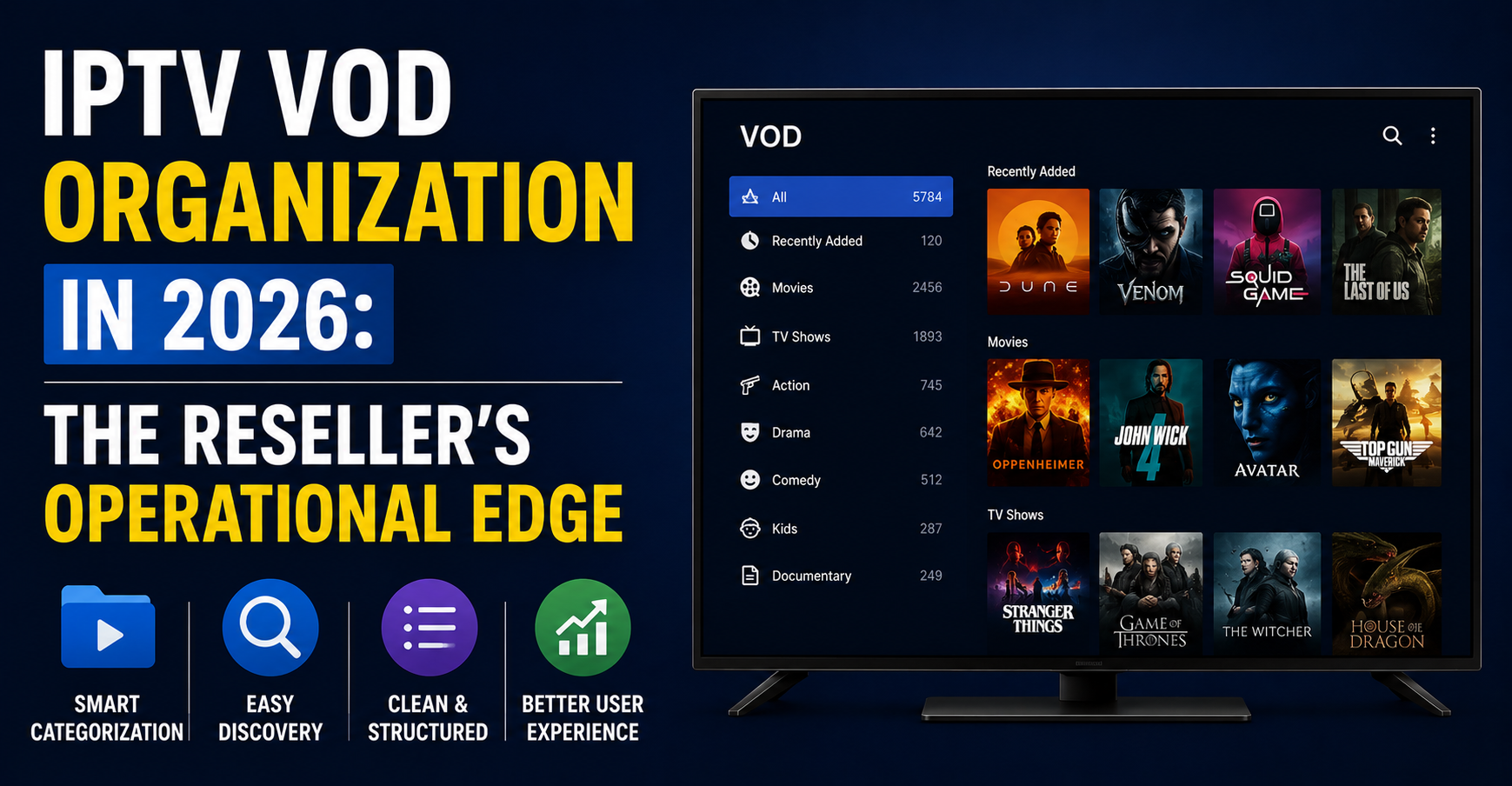
IPTV VOD organization isn’t a cosmetic issue. It’s infrastructure. It determines session duration, repeat usage, perceived value, and whether a household subscriber bothers recommending your service to their cousin. In 2026, with panel competition this dense, your VOD library layout is arguably more important than your channel list, because channels are commoditised, but content discovery is where you differentiate.
This piece breaks down the operational side of IPTV VOD organization from a reseller’s perspective: category architecture, metadata hygiene, panel-level management, and the backend decisions that separate a professional operation from a panel that looks like someone dumped a hard drive into a web interface.
Why Raw VOD Volume Destroys Subscriber Confidence
There’s a persistent myth among newer UK IPTV resellers that more titles equals better value. So they load every piece of content their provider offers, activate every VOD category available, and present subscribers with a wall of unorganised noise. The result is paradox of choice at its worst, a catalogue so bloated that finding a specific film takes longer than watching one.
Effective IPTV VOD organization starts with subtraction. Curating your library down to categories your specific subscriber base actually watches produces better engagement than offering everything. A UK family household doesn’t need six hundred Bollywood titles buried between horror films and Korean dramas with no thumbnail. They need a clean “Family,” “New Releases,” and “Box Sets” section that loads fast and makes sense.
Pro Tip: Pull your most-watched VOD titles from the last 90 days and check whether they’re actually easy to find in your current layout. If your top 20 films are scattered across five generic categories, your IPTV VOD organization is working against you.
The structural problem gets worse at scale. When a reseller manages three hundred or more subscribers, the VOD complaints start clustering: “can’t find anything,” “too much junk,” “my kids keep seeing stuff they shouldn’t.” These aren’t content problems. They’re architecture problems. And they’re solved at the panel level, not by switching providers.
Category Architecture That Actually Reduces Support Tickets
Most IPTV panels give resellers a default VOD category tree that looks something like: Movies, Series, Kids, 4K, XXX. That’s it. Five buckets for potentially thousands of titles. And resellers just leave it because they assume the provider’s structure is the correct one.
It isn’t. Proper IPTV VOD organization means building a category tree that matches how your subscribers actually think about content, not how your provider’s server happens to store it. Consider this breakdown:
| Default provider structure | Reseller-optimised structure |
|---|---|
| Movies | New Releases (Last 30 Days) |
| Series | Trending This Week |
| Kids | Family & Kids (Age-Gated) |
| 4K | Box Sets & Complete Series |
| XXX | Action & Thriller |
| – | Comedy & Light Watching |
| – | Documentaries |
| – | Classic Films |
| – | 4K & HDR Collection |
That right column isn’t just tidier. It reflects decision patterns. A subscriber opening your app at 9pm isn’t thinking “I want a movie.” They’re thinking “something new” or “something easy to watch.” Your IPTV VOD organization should mirror that psychology, not your server’s folder structure.
Panels running Xtream Codes or XUI allow category editing at the reseller level. If yours doesn’t, you’re operating with one hand tied behind your back and should factor that into your next provider evaluation.
Metadata Hygiene: The Backend Work Most Resellers Skip
A VOD title without proper metadata is functionally invisible. No poster image, no synopsis, no year, no genre tag, it just sits in a list as a filename. “The.Prestige.2006.1080p.BluRay.x264” is not a browsable title. It’s a torrent naming convention, and it has no place in a subscriber-facing library.
IPTV VOD organization at the metadata level means ensuring every title has four things: a clean display name, a poster thumbnail, a genre tag, and a year. Without all four, the title degrades your entire library’s perceived quality. One broken thumbnail in a row of clean ones makes subscribers question whether the stream will even work.
Pro Tip: If your provider delivers VOD with inconsistent or missing metadata, build a cleanup workflow using TMDb’s free API to batch-match titles and pull correct poster URLs. Two hours of setup saves you weeks of manual fixes and transforms your IPTV VOD organization overnight.
The deeper issue is that metadata inconsistency compounds. When half your library uses “Sci-Fi” and the other half uses “Science Fiction,” your category filters break. When some titles have release years and others don’t, sorting becomes useless. Subscribers don’t consciously notice these things, they just feel like the service is messy. And messy drives churn faster than buffering does, because buffering feels like a technical problem that might be fixed, but a disorganised library feels like nobody cares.
Panel-Level VOD Controls Every Reseller Should Be Using
Depending on your panel software, you have more control over IPTV VOD organization than you probably realise. Most resellers interact with their panel at the subscription level, adding credits, creating lines, managing renewals. But the VOD management section is where the actual product experience is shaped.
Key panel-level actions that sharpen your VOD presentation:
- Category visibility toggles: Hide categories irrelevant to your market. If you serve family households, disable adult content categories entirely rather than relying on subscriber-side parental controls.
- Sort order overrides: Force “Newest First” as default rather than alphabetical. Alphabetical sorting buries new content under a wall of titles starting with “A” and “The.”
- Pinned categories: Some panels let you pin specific categories to the top of the VOD section. Pin “New This Week” or “Trending” to ensure subscribers see fresh content immediately.
- Bulk category reassignment: Move titles between categories in batches rather than one by one. This is essential during seasonal content refreshes.
If your panel doesn’t support at least category editing and sort control, your IPTV VOD organization ceiling is defined by your provider’s defaults, and that ceiling is usually low.
How IPTV VOD Organization Affects Household vs. Reseller Subscribers Differently
A household subscriber and a sub-reseller interact with your VOD library in fundamentally different ways, and your IPTV VOD organization needs to account for both.
The household user browses. They scroll, they look at thumbnails, they read synopses. Their experience is visual and intuitive. For them, broken posters, miscategorised titles, and cluttered layouts are immediate friction points. They’ll compare your interface, even unconsciously, against the Netflix or Prime Video experience they’re used to. You won’t win that comparison, but you can lose it badly if your library looks like a file server.
Pro Tip: When onboarding household subscribers, send a short message highlighting three to five VOD sections by name. “Check out our New Releases and Box Sets sections” gives them an entry point rather than dumping them into a 10,000-title ocean. This single gesture improves VOD engagement and makes your IPTV VOD organization feel intentional.
The sub-reseller, meanwhile, evaluates your VOD library as a product feature. They’re asking: can I sell this? Will my customers complain? Does this look professional enough that I can charge a premium? For sub-resellers, IPTV VOD organization is a trust signal. A clean, well-structured library tells them your operation is serious. A messy one tells them you’re just flipping credits from a provider you haven’t bothered to customise.
Both audiences churn for different reasons, but both churn routes pass through the same problem: a VOD section that doesn’t feel managed.
Content Rotation and the Freshness Perception Problem
Your VOD library could have five hundred new titles added last month, but if those titles are scattered across generic categories with no visual distinction, subscribers won’t notice. Freshness in IPTV VOD organization isn’t about having new content, it’s about making new content obvious.
This is where dedicated time-based categories earn their keep. A “New This Week” or “Added in May 2026” category does something no amount of total library size can do: it signals that someone is actively managing this service. That signal matters enormously for retention, because the alternative perception, “this is just a static dump of files,” kills the sense of value that justifies monthly payments.
Rotation also means removing stale or broken content. Dead links sitting in your VOD library are worse than having fewer titles. A subscriber who clicks three titles and gets playback errors will assume your entire library is broken, even if 98% of it works fine. Regular audits, monthly at minimum, where you test random titles across categories are a basic operational discipline that most resellers neglect entirely.
| Practice | Impact on subscriber perception |
|---|---|
| Dedicated “New This Week” category | Signals active management |
| Removing dead/broken links monthly | Prevents error-driven churn |
| Seasonal category rotation | Creates return visits |
| Thumbnail consistency audit | Elevates perceived quality |
| Hiding empty or near-empty categories | Prevents “ghost town” feeling |
This table isn’t theoretical. Every row represents a real churn trigger that proper IPTV VOD organization neutralises before it becomes a support ticket, or worse, a silent cancellation.
The HLS Latency and Buffering Connection to VOD Layout
You might not immediately connect IPTV VOD organization with streaming performance, but they’re linked in ways that affect subscriber experience directly. When your VOD library is bloated with thousands of unmanaged titles, the panel’s API response time for loading category listings increases. Every additional title in a category is another database query, another thumbnail to fetch, another metadata entry to parse.
On Xtream Codes-based panels, the VOD API call returns the full category contents in a single JSON payload. If your “Movies” category contains three thousand titles, that’s a three-thousand-item JSON response that the subscriber’s app has to download and render. On slower connections or older devices, Firesticks, MAG boxes with limited RAM, this creates noticeable lag that subscribers blame on “buffering,” when really it’s an interface bottleneck caused by poor IPTV VOD organization.
Pro Tip: Keep individual VOD categories under 300 titles. Beyond that threshold, loading times increase noticeably on mid-range devices. Split oversized categories into sub-genres. “Action” with 800 titles becomes “Action: New Releases,” “Action: Classics,” and “Action: Foreign,” each under the threshold and faster to load.
DNS poisoning and ISP-level blocking further complicate this. When a subscriber’s DNS request for VOD content routes through a poisoned resolver, the failure looks identical to a broken stream, but it’s actually a delivery path issue. Your IPTV VOD organization can’t fix DNS poisoning, but it can reduce the volume of failed requests by ensuring dead content is removed promptly and CDN endpoints are validated during your audit cycles.
Scaling IPTV VOD Organization Across Multiple Panels
Resellers managing more than one panel, whether for redundancy, different providers, or white-label brands, face a multiplication problem. Every panel has its own category structure, its own metadata quality, and its own VOD management tools. Maintaining consistent IPTV VOD organization across three or four panels becomes an operational headache fast.
The practical approach is standardisation. Build a master category template, your ideal structure, and replicate it across every panel you manage. Document it. Share it with any team members or sub-resellers who have panel access. Treat your VOD category architecture like brand collateral: it should be consistent everywhere your service appears.
Backup uplink servers add another layer. When your primary provider’s VOD server goes down and traffic fails over to a backup, the backup’s category structure may not match your primary. Subscribers suddenly see different categories, missing titles, and broken navigation. This is preventable if your IPTV VOD organization accounts for failover from the start, ensuring backup servers mirror your primary structure as closely as possible, or at minimum that the most-used categories exist on both.
Maintain a written category template with exact names, sort orders, and title count targets
Audit backup panel VOD structure quarterly against your primary
Assign one person in your operation as “VOD manager” if you serve 500+ subscribers
Use a spreadsheet to track which titles exist on which panel for cross-referencing during outages
Load balancing across VOD delivery nodes is equally relevant. If certain categories are disproportionately popular, box sets, for instance, typically see higher concurrent streams than niche genres, your CDN allocation should reflect that. IPTV VOD organization isn’t just about what subscribers see; it’s about how your infrastructure prioritises what they’re most likely to watch.
Frequently Asked Questions
What exactly is IPTV VOD organization and why should resellers care about it?
IPTV VOD organization refers to how your video-on-demand library is structured, categorised, and presented to subscribers within your IPTV Reseller panel. Resellers should care because a disorganised library directly drives subscriber churn, users who can’t find content quickly stop using VOD entirely, reducing the perceived value of the service and making non-renewal far more likely during the next billing cycle.
How many VOD categories should a reseller panel ideally have?
There’s no universal number, but most professional operations perform well with 12 to 20 active categories. Fewer than 8 means categories are too broad and browsing becomes overwhelming. More than 25 risks fragmenting your library so thinly that categories feel empty. The right count depends on your total title volume and subscriber demographics.
Can poor IPTV VOD organization actually cause buffering issues?
Not buffering in the traditional stream-delivery sense, but oversized categories cause interface lag on subscriber devices. When a single category returns thousands of titles via API, older hardware like first-generation Firesticks or entry-level MAG boxes struggles to render the list, creating stuttering and delays that subscribers perceive as buffering.
How often should I audit my VOD library for dead links and broken content?
Monthly is the minimum professional standard. Weekly is better if your provider adds content frequently. Dead links are among the fastest destroyers of subscriber trust, three failed playback attempts in a row will convince a user your entire service is unreliable, regardless of how well your live channels perform.
Is IPTV VOD organization different for family subscribers versus individual users?
Yes. Family-oriented panels benefit from age-gated categories, a dedicated kids section with curated content, and hidden adult categories. Individual users tend to value genre specificity and trending or new release sections more. Your IPTV VOD organization should reflect the dominant subscriber type in your base.
What panel features are essential for managing VOD organization effectively?
At minimum, you need category editing, sort order control, bulk title reassignment, and category visibility toggles. Panels that also support pinned categories, custom thumbnails, and metadata editing give UK IPTV resellers significantly more control over the subscriber experience.
How does IPTV VOD organization affect sub-reseller recruitment?
Sub-resellers evaluate your panel as a product they’ll resell under their own brand. A well-organised VOD library signals operational professionalism and makes their sales pitch easier. Messy, uncurated content libraries are a common reason sub-resellers choose competing providers, they can’t sell a product that looks unfinished.
Should I remove content to improve IPTV VOD organization even if it reduces my total title count?
Absolutely. A curated library of 3,000 working, well-categorised titles with clean metadata outperforms a bloated 15,000-title dump where half the links are dead and thumbnails are missing. Subscribers value discoverability and reliability over raw numbers every time.
Reseller Success Checklist: IPTV VOD Organization
- Audit your current VOD category structure against your actual subscriber demographics, remove categories nobody uses and create ones that match browsing behaviour.
- Set a hard limit of 300 titles per category and split anything larger into sub-genre groupings.
- Run a metadata completeness check: flag every title missing a poster, synopsis, genre tag, or year, and batch-fix using TMDb matching.
- Create a “New This Week” or “Recently Added” category and update it every content refresh cycle.
- Test five random VOD titles per category monthly for playback failures, remove dead links immediately.
- Disable or hide adult content categories at the panel level for any subscriber line flagged as family or household.
- Document your master category template and replicate it across every panel and backup server you operate.
- Verify that your backup uplink server’s VOD structure mirrors your primary, test failover navigation quarterly.
- Brief your sub-resellers on your VOD structure so they can guide their own subscribers to high-value sections.
- Review your full IPTV VOD organization against this checklist every 60 days, treat it as operational maintenance, not a one-time setup.
Start building a cleaner, retention-focused VOD operation today at britishseller.co.uk.