
IPTV Xtream Codes API Explained: A Plain Guide for Anyone Starting Out
The IPTV Xtream Codes API is a set of instructions that lets an app talk to an IPTV server, asking it “what channels exist, what’s playing, and is this user allowed in?” and getting answers back in a tidy, predictable format. That’s the whole thing in one sentence. When you type a username, password, and server address into an IPTV app and your channel list appears, the Xtream Codes API is the quiet messenger carrying that request to the server and bringing the reply home. Everything else in this article is just unpacking that simple idea.
Why this matters before we go deeper
If you’re a reseller, a subscriber, or just someone curious about how these systems hang together, understanding the API saves you real headaches. It explains why some apps work instantly while others throw errors, why your login details are formatted the way they are, and why panels behave consistently across totally different devices. You don’t need to be a programmer to follow along. You just need someone to explain it like a friend would, which is exactly what we’re doing here.
What the IPTV Xtream Codes API Actually Does
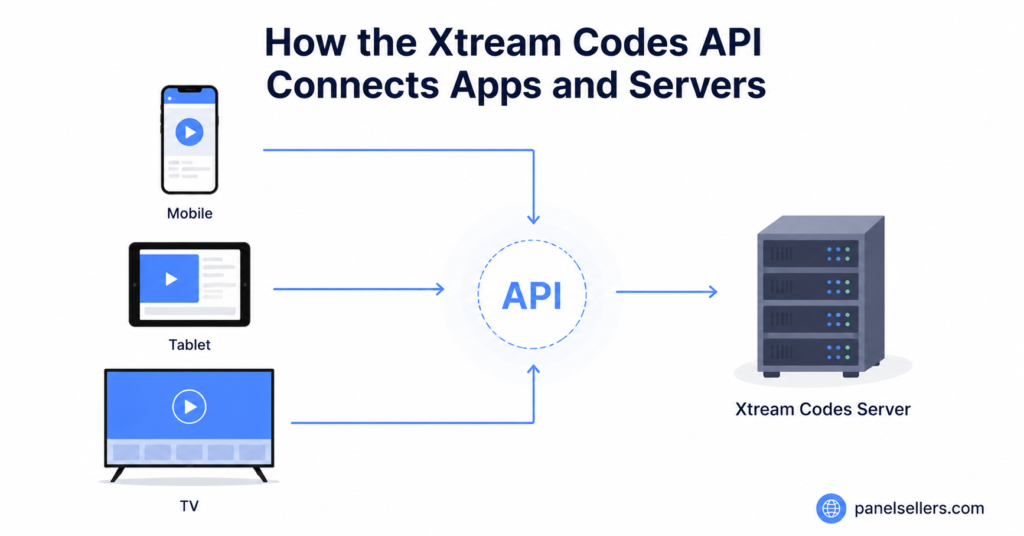
Think of a restaurant. You don’t walk into the kitchen and cook your own meal. You hand a waiter your order, the waiter takes it to the kitchen, and food comes back. The API is that waiter. Your IPTV app is you, the customer. The server is the kitchen, full of channel data and user records you never see directly. The API carries your request in, fetches the answer, and lays it on your table in a format your app can read.
This matters because it keeps things organised. The server doesn’t need to know which app you’re using, and your app doesn’t need to know how the server stores its data. They just agree on a shared language. That shared language is what makes one panel work across phones, tablets, smart TVs, and set-top boxes without anyone rewriting anything for each device.
Pro Tip: If an app asks for “Xtream Codes login” or “Xtream Codes API URL,” it’s simply asking for your server address, username, and password. Same three details, different label. Don’t overthink it.
How the IPTV Xtream Codes API Explained Through a Login
Let’s walk through what happens the second you tap “connect.” Your app bundles three things together: the server address, your username, and your password. It sends them to a specific web address on the server, the API endpoint. The server reads them, checks its records, and decides whether to let you in.
If your details match and your subscription is active, the server replies with a yes, along with extra information: when your line expires, how many connections you’re allowed, and what kind of account you have. If something’s wrong, an expired subscription or a typo, it replies with a no. Your app then shows you either your channel list or an error. The whole exchange takes a fraction of a second.
The reason the IPTV Xtream Codes API explained this way clicks for most people is that it mirrors how websites log you in every day. Same handshake, same logic, just applied to streaming instead of email or social media. If you want to see how reseller panels handle these connections at scale, the how IPTV reseller panels work walkthrough breaks the dashboard side down clearly.
The Building Blocks: Lines, Connections, and Credits
Three words come up constantly in this world, and the API touches all of them. A “line” is a single subscription account, one username and password pair that grants access. A “connection” is one active stream from that line. A line allowed two connections means two devices can watch at once before the third gets blocked. “Credits” are what resellers spend to create lines in the first place.
Here’s how they connect. When a reseller creates a line through their panel, the panel talks to the server, and the server registers that line in its database. From then on, every time that line logs in, the Xtream Codes API checks it against the connection limit the reseller set. Go over the limit, and the API politely refuses the extra stream.
| Term | What It Means | Who Controls It |
|---|---|---|
| Line | One subscription account | Reseller |
| Connection | One active stream | Server, via the API |
| Credit | Currency to create lines | Reseller buys it |
Pro Tip: If a customer complains a stream “kicks them out,” it’s usually a connection limit, not a fault. Check how many devices are logged in before assuming the server is down.
Why the IPTV Xtream Codes API Explained Matters for Resellers
If you run a reseller business, the API is the engine under your dashboard, even if you never see it. Every action you take, creating a line, extending a subscription, checking who’s online, sends a request through it. Understanding this changes how you troubleshoot. When a customer says “it’s not working,” you can now ask better questions because you know what’s happening behind the screen.
For example, if a whole batch of your customers report errors at once, that points to the server or the API itself, not individual accounts. But if it’s just one customer, the problem is almost always their line, their device, or their connection count. Knowing where the API sits in the chain helps you locate the fault fast instead of guessing.
This is also why panel choice matters. A well-built panel sends clean, correct requests to the API and reports back accurate information. A poorly built one can show you stale data or fail silently. If you’re comparing options, the IPTV reseller credit packages page lays out how credits and lines map together so you can plan margins before committing.
Pro Tip: Keep a simple log of which customer is on which line. When something breaks, the API can only tell you about the line, so you need to know who that line belongs to.
The Honest Bit: Where the Legal Grey Area Sits
It would be dishonest to explain this technology without naming the elephant in the room. The Xtream Codes API itself is just software, a neutral tool, like a delivery van. What travels through it is where legality lives. Plenty of services use this exact technology legitimately, delivering content they hold the rights to, running internal company channels, or providing licensed streaming.
The grey area appears when panels distribute copyrighted channels without the proper rights. That’s not a flaw in the API; it’s a choice made by whoever runs the server. As a reseller or subscriber, it’s worth knowing the difference. The technology is legal. How a specific operator uses it may not be. This guide explains the plumbing, not a green light to pipe anything through it.
If you’re building a business in this space, the safest ground is operational and infrastructure focus: panel management, dashboard tools, customer support, and clear billing. Those are durable. Treating the legal side honestly, rather than pretending it doesn’t exist, is also what separates a serious operator from a fly-by-night one.
Player API vs Panel API: Two Sides of the Same Coin
People often blur these two, so let’s separate them gently. The “player API” is the part your customer’s app uses, logging in, fetching the channel list, loading the programme guide. It’s read-focused. The customer asks questions and receives answers, but can’t change anything on the server.
The “panel API” is what the reseller’s dashboard uses. It can create, edit, and delete lines. It’s write-focused. This split exists for a good reason: you don’t want a customer’s app to accidentally delete accounts, and you don’t want a reseller fumbling through a basic viewing app to manage their business. Each side gets the powers it needs and none it doesn’t.
| API Side | Used By | Main Power |
|---|---|---|
| Player API | Customer’s app | Read and watch |
| Panel API | Reseller dashboard | Create and manage |
Understanding this division is genuinely useful. It tells you that a viewing app can never damage your business, and that your management tools live in a separate, more protected layer. For deeper operational reading, the IPTV reseller Panel guides and blogs section covers dashboard workflows in practical detail.
Common Errors and What They Really Mean
When the IPTV Xtream Codes API hands back an error, it’s usually saying one of a few simple things. “Authentication failed” almost always means a wrong username or password, or an expired line. It’s the most common message and the easiest to fix: re-check the three login details and the expiry date.
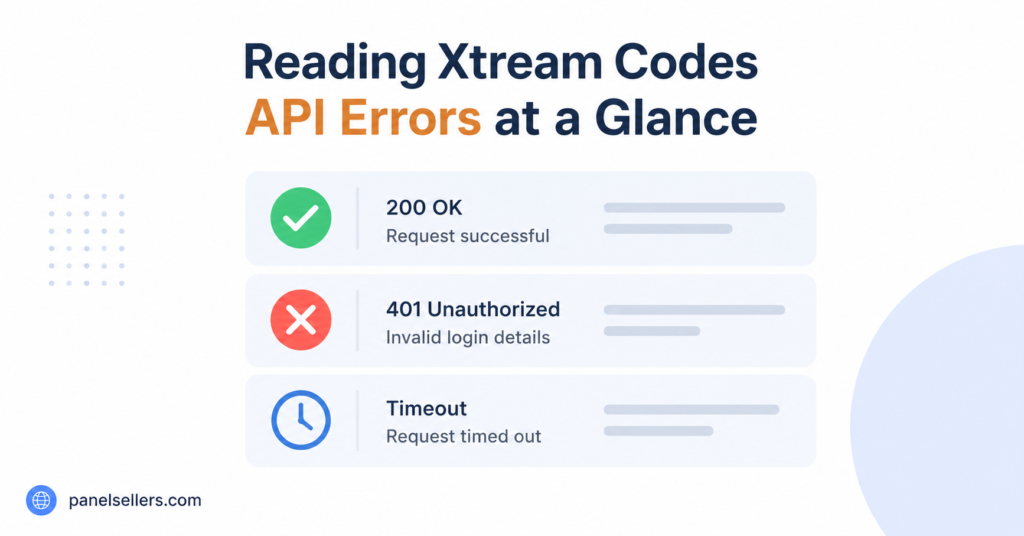
“Max connections reached” means the line is being used on more devices than allowed. Not broken, just busy. “Account disabled” usually points to a reseller switching the line off or a subscription lapsing. And a blank or endlessly loading channel list often means the app reached the server but the line has no package assigned to it yet. Each message is the API being honest about a specific, fixable state. Once you learn to read them, half your support tickets answer themselves.
Pro Tip: Before escalating anything to a provider, screenshot the exact error text. The wording tells an experienced operator almost immediately whether it’s a login, a limit, or a server issue.
How the IPTV Xtream Codes API Explained Fits the Bigger Picture
Step back and the whole system makes sense as layers. At the bottom sits the server, holding channels and user records. On top of that sits the API, the agreed language. Above that sit two kinds of software: customer apps speaking the player side, and reseller panels speaking the panel side. Above all of that sit the actual humans, subscribers watching and resellers selling.
The beauty of this design is that each layer can change without breaking the others. A reseller can switch panel software and the customers never notice, because both panels speak the same API. A customer can switch from a phone to a smart TV, and the server doesn’t care, because both apps speak the same API. That stability is exactly why this particular system became the standard so many providers, like britishseller.co.uk among others, build their operations around.
This layered thinking is the real payoff of understanding the API. It turns a confusing tangle of apps, logins, and dashboards into a clear stack where you always know which layer a problem belongs to.
Setting Up a Line: What Happens Behind the Scenes
When a reseller creates a new subscription, a short sequence fires off. The panel collects the settings: username, password, expiry date, connection limit, and which package of channels to attach. It sends these to the server through the panel side of the API. The server writes a new record and confirms it back. Within seconds, that line is live and ready to log in anywhere.
From the subscriber’s side, none of this is visible. They simply receive three details and an app, type them in, and watch. The entire creation, validation, and delivery pipeline stays hidden, which is exactly the point. A good system hides its complexity and shows only what each person needs.
That’s why two people can have wildly different relationships with the same technology. The subscriber experiences a login box. The reseller experiences a dashboard. The API quietly serves both, translating between the human-friendly front and the data-heavy back.
Conclusion: The IPTV Xtream Codes API Explained, Simply
Strip away the jargon and the IPTV Xtream Codes API is just a translator and a messenger rolled into one. It lets apps and servers talk in a shared language, checks who’s allowed in, fetches channel lists, and reports back honestly when something’s off. For subscribers, it’s the invisible reason their login simply works. For resellers, it’s the engine powering every line, credit, and dashboard action they take.
Understanding it doesn’t require code. It requires the mental picture we built here: a layered system where servers hold the data, the API carries the conversation, apps and panels speak their own sides of it, and people sit comfortably on top. Once that picture is clear, errors stop being mysterious, troubleshooting gets faster, and the whole ecosystem finally makes sense. And keeping the legal grey area in honest view, rather than ignoring it, is what keeps a business on solid ground. That’s the IPTV Xtream Codes API explained, end to end, in plain language anyone can use.
Quick Checklists by Audience
For the Subscriber
- Keep your three login details (server address, username, password) saved somewhere safe.
- Note your connection limit so you know how many devices can watch at once.
- When an error appears, read the exact wording before assuming the worst.
- Check your expiry date first if a working setup suddenly stops.
- Restart the app once before reporting any fault.
For the Reseller
- Log which customer holds which line so you can match errors to people.
- Track your credit balance so you never run dry mid-sale.
- Set sensible connection limits to reduce “kicked out” complaints.
- Learn the three or four common API error messages by heart.
- Confirm a package is attached before handing a line to a customer.
For the Sub-Reseller
- Understand the limits your parent reseller has placed on your panel.
- Keep your own customer records separate and clear.
- Pass accurate login details to customers the first time to cut support load.
- Know who to escalate to when an issue sits above your access level.
- Reinvest in credits early rather than scrambling when demand spikes.