IPTV Reseller Panel Webhooks are automatic HTTP messages sent to an address you control whenever something happens on the reseller side, such as a line being created, a renewal being paid, an account nearing expiry or your credit balance running low. Setting them up properly comes down to six things: an HTTPS endpoint, a shared secret, a short list of events you actually need, signature and timestamp checks on every delivery, a fast 2xx response, and a record of event IDs so the same message is never acted on twice. Test all six with deliberately broken deliveries before a single real credit is involved.
Before writing any code, find out which side of your setup can send events at all. Plenty of reseller panels offer no outbound webhooks, and on some panel software even the reseller API is an optional extra that the panel owner has to enable for your account group. In those setups the webhook usually comes from your payment provider or online shop, and your handler is the piece that calls the panel to create or extend the line. The security rules are the same in both directions, but the setup steps, and the failures you need to test for, are not.
Which Side Sends the Event in Your Setup
There are three common arrangements, and most confusion during setup comes from assuming the wrong one.
In the first, the panel itself sends outbound webhooks. You register a URL in the dashboard, pick event types, and the panel posts a message whenever a line changes state or credits are deducted. This is the cleanest arrangement, but it depends entirely on the panel software and on whether your provider has exposed the feature to resellers rather than keeping it for admin accounts.
In the second, your billing system sends the webhook. A customer pays through your shop or payment provider, the provider posts a “payment succeeded” event to your server, and your server calls the panel API to provision or renew the line. Here the panel never sends anything. It simply receives authenticated API calls from you.
The third is a polling bridge. Neither side pushes events, so a scheduled job queries the panel every few minutes, compares results with the last run and generates internal events when something changes, such as a line passing its expiry date. It is slower and heavier than a true webhook, but it is often the only route when a panel exposes read access and nothing else.
Many resellers end up running two of these at once: payment webhooks driving provisioning, and a polling job catching expiries. That is fine, provided each event type has exactly one source. Two systems both announcing “line renewed” is how customers receive duplicate confirmation messages, or worse, duplicate renewals. If you are still at the stage of choosing a panel, it is worth reading how IPTV reseller panels and credits work end to end before deciding where automation should sit.
Anatomy of One Event: A Renewal Followed From Payment to Panel
Abstract advice about webhooks is easy to nod along to and hard to apply, so it helps to follow a single event through the system.
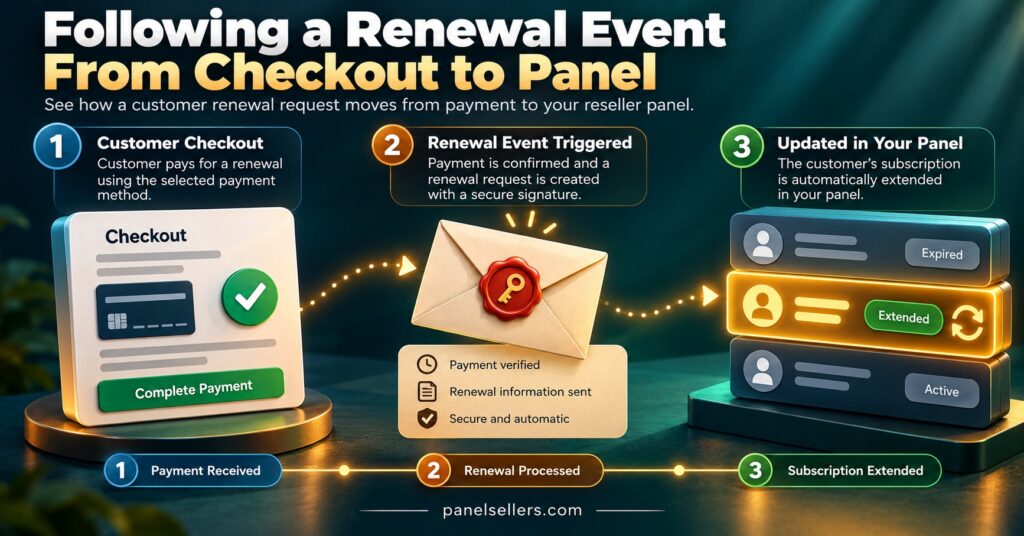
Picture a customer renewing a twelve-month line late in the evening. Their payment clears, and within seconds your payment provider posts a message to your endpoint. That message has two parts: headers carrying a timestamp and a signature, and a JSON body describing what happened. Field names differ between providers and panels, so treat the example below as illustrative rather than a standard, but a well-designed renewal event carries roughly this information:
| Field | Example value | Why it matters |
|---|---|---|
| event_id | evt_7Q2K91 | Unique per event; your duplicate check depends on it |
| event_type | line.renewed | Tells your handler which routine to run |
| occurred_at | 2026-10-28T21:14:05Z | Lets you spot stale or out-of-order events |
| line_ref | L-40218 | Internal reference, never the line’s username or password |
| term_months | 12 | What the customer actually paid for |
| credits_charged | 1 | Lets you reconcile your credit balance afterwards |
Notice what is missing. A sensible payload never contains the subscriber’s login credentials, payment card data or anything you would be uncomfortable seeing in a log file, because webhook bodies routinely end up in logs, retry queues and monitoring dashboards. If a provider sends line passwords inside webhook bodies, treat that as a reason to restrict who can read those logs, and raise it with the provider.
Your endpoint then has a very short job. It verifies the signature, checks the timestamp, confirms the event ID has not been processed before, stores the event and returns a 200 response. Only after that, in a background job, does anything talk to the panel. The panel call that extends line L-40218 by twelve months happens away from the original HTTP request, which matters because panel APIs are not always quick, and a sender waiting on a slow response will eventually assume failure and send the event again.
Setting Up IPTV Reseller Panel Webhooks Without Spending Credits Twice
Whichever arrangement you use, the setup sequence is broadly the same.
Start with the endpoint. It needs a public HTTPS address on a server you control, ideally a path dedicated to one sender, such as one route for your payment provider and another for panel events. Separate routes mean separate secrets, separate logs and the ability to switch one off without touching the other. Plain HTTP is not acceptable here, because anyone on the network path could read or alter the payload.
Next, generate and store the shared secret. Most senders show the signing secret once, at the moment you create the webhook, so copy it straight into an environment variable or secrets manager rather than a spreadsheet or chat message. Anyone holding that secret can forge events your system will trust.
Then choose events narrowly. Subscribing to everything feels thorough but creates noise, more code paths and more things to test. A reseller automating renewals typically needs only a handful: payment succeeded, payment refunded or disputed, line created, line renewed, and either a low-credit warning or a scheduled balance check. Credit visibility matters more than it first appears, because an automated renewal that fires when your balance is empty fails silently from the customer’s point of view. Knowing your package size and how credits convert to lines, which you can compare on the IPTV reseller panel credit packages page, helps you set a realistic low-balance threshold.
Finally, decide what the handler does when the panel refuses an action. Insufficient credits, a suspended line or an API key that has been revoked should each produce a stored failure and an alert to a person, not a retry loop. Retrying a request the panel has already rejected for a business reason will not change the answer.
Pro tip: Give the API key your handler uses the narrowest permissions your panel allows. If the handler only extends existing lines, it should not be able to create sub-reseller accounts or change bouquets, so a leaked key causes limited damage.
Validating a Delivery Before Anything Touches the Panel
Signature checking is the part most often done slightly wrong, and slightly wrong is effectively not done.
The common pattern, used by major payment platforms and code hosts, works like this. The sender takes the timestamp and the exact raw body, joins them in a defined way (often the timestamp, a full stop, then the body), and computes an HMAC-SHA256 hash using the shared secret. That hash travels in a header. Your server repeats the same calculation with its copy of the secret and compares the two values. If they match, the message came from someone holding the secret and was not altered in transit. The GitHub guide to validating webhook deliveries and the Stripe webhook documentation both describe this approach in detail, and your sender’s own documentation will state its exact format.
Three details decide whether the check actually protects you.
First, hash the raw bytes as received. Many web frameworks parse JSON automatically, and if you re-serialise the parsed object, spacing or key order can change and the signature will never match. Developers who hit this often “fix” it by loosening the check, which defeats the purpose.
Second, compare signatures with a constant-time function rather than an ordinary string comparison. Standard comparisons stop at the first mismatched character, which can leak timing information an attacker could use.
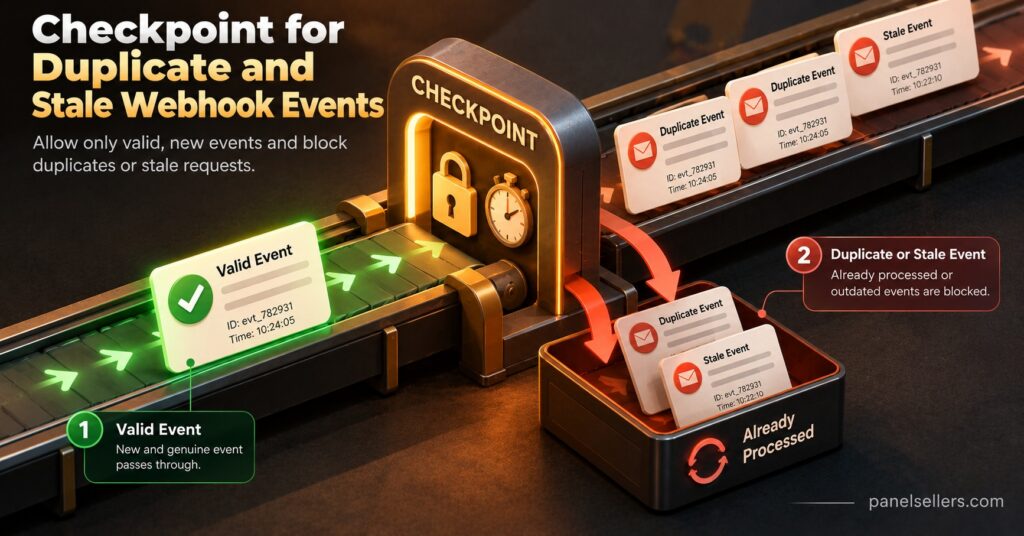
Third, check freshness. A valid signature only proves the message was genuine at some point. Without a timestamp check, someone who captures one legitimate renewal could resend it later. A tolerance of around five minutes is a common default. In practice it looks like this: an event signed at 21:14:05 and received at 21:14:09 passes; the same captured request replayed at 21:23:00 fails the freshness check even though its signature is perfectly valid, and your handler rejects it before the duplicate check is even reached.
Rejections should return a 4xx status and be logged with the reason (bad signature, stale timestamp, unknown event type), never with the secret. A sudden run of signature failures is worth an alert, because it usually means either a rotated secret that one side has not picked up, or someone probing the endpoint.
Duplicates, Disorder and the Slow Panel Problem
Webhook senders generally promise at-least-once delivery, not exactly-once. If your endpoint times out, returns an error or loses its connection mid-response, the sender retries, often with growing intervals between attempts. That is good for reliability and dangerous for anything that spends credits.
The protection is idempotency. Before processing, try to insert the event ID into a table with a unique constraint. If the insert succeeds, store the job and continue. If it fails because the ID already exists, return 200 straight away and do nothing else. Returning an error for a duplicate is a classic mistake, since the sender reads it as failure and keeps retrying.
There is a subtler trap. If you record the event ID first and the server crashes before the background job is saved, the retry will be treated as a duplicate and the renewal will never happen. Saving the event ID and the queued job in a single database transaction closes that gap.
Duplicate IDs are not the only source of double processing. Some senders emit two genuinely different events for one real-world change, each with its own ID. For actions that cost credits, add a second guard based on the business object: before extending line L-40218, ask the panel for its current expiry date and confirm the extension has not already been applied.
Order is not guaranteed either. An “expiring soon” event generated before a renewal can arrive after it, and a naive handler will send a renewal reminder to someone who paid five minutes ago. Use the occurred_at value, or better, re-read the line’s current state from the panel before sending any customer message. The webhook tells you something changed; the panel tells you what is true now.
This matters more in layered setups. If you run sub-resellers, their lines usually draw from your credit pool, so a duplicated renewal on their side is a real cost on yours. The arrangement is explained further in this guide to how an IPTV sub-reseller panel draws on a parent account.
A Test Plan Worth Running Before Go-Live
Most senders offer a “send test event” button or a command-line tool that forwards events to a development machine. That proves the pipe works. It does not prove the handler fails safely, which is the part that protects your credits. Run these tests against a test line or sandbox account first:
| Test | What you send | Pass condition |
|---|---|---|
| Valid delivery | A genuine signed test event | 200 returned, event stored, panel action queued once |
| Tampered body | Same event with one value edited, original signature kept | Rejected with 4xx, nothing queued |
| Stale timestamp | A valid event replayed outside the tolerance window | Rejected with 4xx and logged as stale |
| Exact duplicate | The same event ID sent twice | Second copy returns 200 and changes nothing |
| Out of order | An expiry warning dated before a renewal, delivered after it | No reminder sent to the renewed customer |
| Panel unavailable | Valid event while the panel API is blocked | 200 to sender, job retried later, alert raised |
| Endpoint down | Sender delivers while your server is offline | Retries succeed after recovery, one renewal applied |
The last two deserve real time. Block the panel API from your test server, send a renewal and confirm the job waits and retries rather than disappearing. Then take your endpoint offline for a while, let the sender’s retries build up, bring it back and check that exactly one extension lands on the test line. If either test leaves you unsure what happened, your logging is not detailed enough yet.
Keeping the Integration Honest After Launch
A webhook integration that passed testing can still drift. A few habits keep it trustworthy.
Run a daily reconciliation job that compares your own records with the panel: every paid renewal should match a real expiry date change, and every credit deduction should match a sale. Webhooks are a fast notification layer, not a source of truth, and reconciliation catches the rare event that never arrived.
Rotate signing secrets on a schedule and whenever someone with access leaves. Senders that support it let you accept old and new secrets for a short overlap, so nothing is rejected during the switch.
Keep an eye on response times. If your endpoint starts taking several seconds to reply, something synchronous has crept back into it, and retries and duplicates will follow.
If you sell under your own brand, remember that customer-facing messages triggered by webhooks are part of that brand. Confirmation emails and expiry reminders should use your domain and wording, a point covered in more depth in this look at what a white label IPTV reseller panel actually rebrands.
One boundary is worth stating plainly. Webhooks automate account administration: payments, renewals, credits and notifications. They say nothing about whether the content delivered through a service is properly licensed. IPTV is a delivery technology, and lawful operation still depends on the provider holding the relevant distribution rights for your market.
Questions Resellers Ask During Setup
My panel has no webhook settings. Can I still automate renewals?
Yes, provided the panel offers an API you are permitted to use. Let your payment provider’s webhooks trigger renewals through that API, and use a scheduled job to read line expiry dates for reminders. Confirm with your provider that API access is enabled for your account before building anything.
What status code should my endpoint return?
Return a 2xx code once the event is verified and safely stored, a 4xx for failed signatures or stale timestamps, and a 5xx only when you genuinely want the sender to try again, such as when your database is unavailable.
Should the webhook handler call the panel directly?
Not inside the HTTP request. Store the event, reply quickly, and let a background worker make the panel call with its own retries. That keeps the sender’s timeout away from the panel’s response time.
How long should I keep processed event IDs?
At least as long as the sender’s maximum retry window, and longer if you rely on them for audits. Many operators keep them for several weeks, then archive them.
Can I test with a real customer line?
Avoid it. Use a dedicated test line or sandbox so a failed duplicate test cannot extend, suspend or charge a paying customer’s account.
Getting IPTV Reseller Panel Webhooks Right
IPTV Reseller Panel Webhooks are worth setting up because they remove the delay and guesswork from renewals, credit monitoring and customer notifications, but only when the receiving side is built to distrust what arrives. Verify every signature against the raw body, reject anything outside your time window, treat each event ID as single-use, and let the panel’s current state, not the message, decide what a customer is told. If your panel cannot send events itself, that is not a dead end; drive automation from your payment provider and an API you are allowed to use. Your next step is practical: list the five or six events your business genuinely needs, then run the failure tests above on a test line before connecting anything that spends real credits.